Process Draft: More Permissions for Process Owners & Validity Modifications
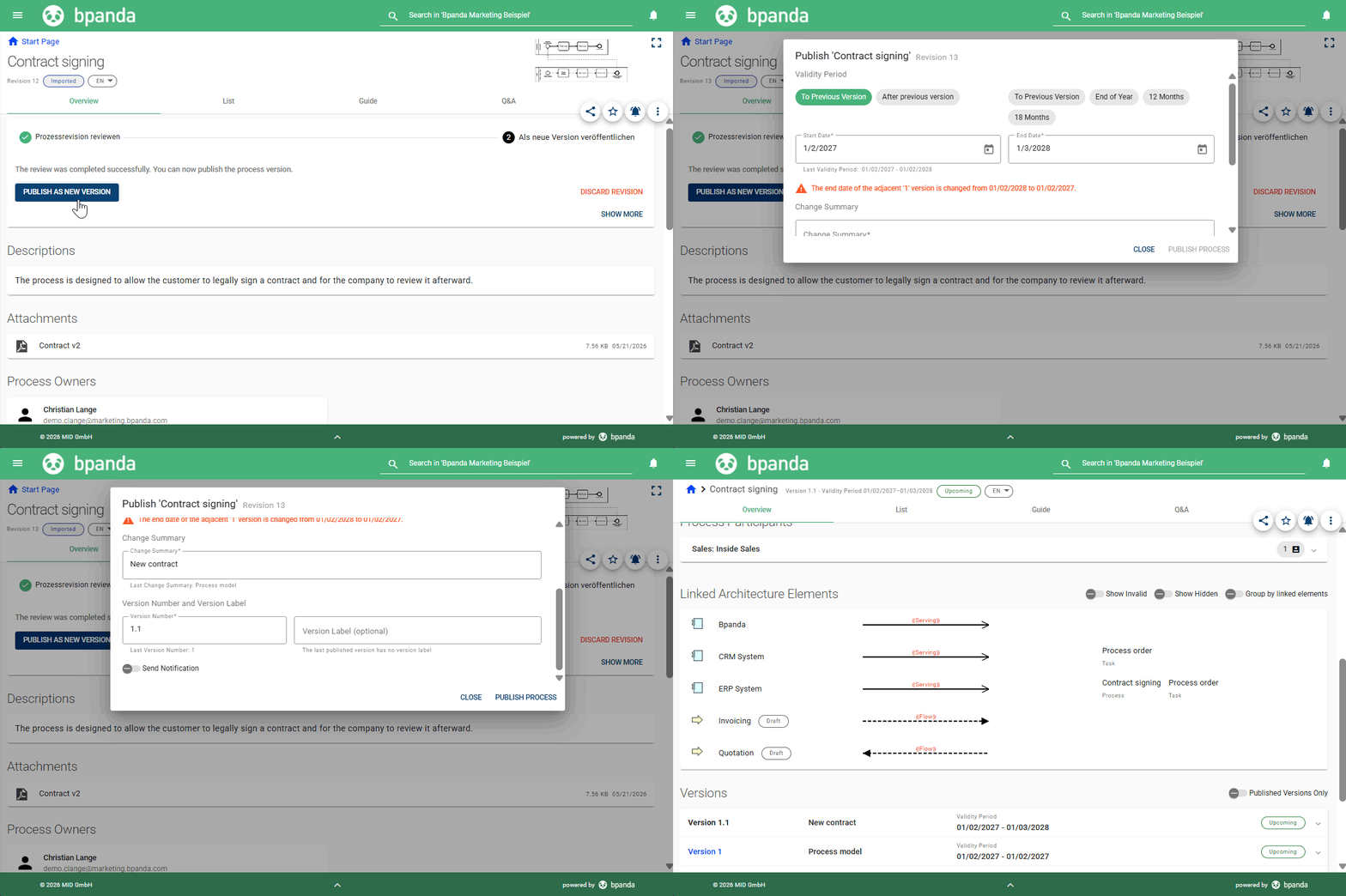
Since the last release, changes to the process (e.g. switching out an attached link or adding process properties for analysis) can only be made in the process draft. This means that there may be more process versions. Our May 20 release now enables Process Owners in Bpanda to make changes to process information and then republish the process (perhaps even without the need for a review); this now makes it much easier to maintain processes and process versions. Publishing validity always starts with “Today” and finishes with “To Previous Version”. This adds the new revision exactly where you need it. Watch out: Only Process Designers and BPM Managers can model processes; the process diagram is read-only for Process Owners.
Process Draft: Merging a Collaboration in a Process
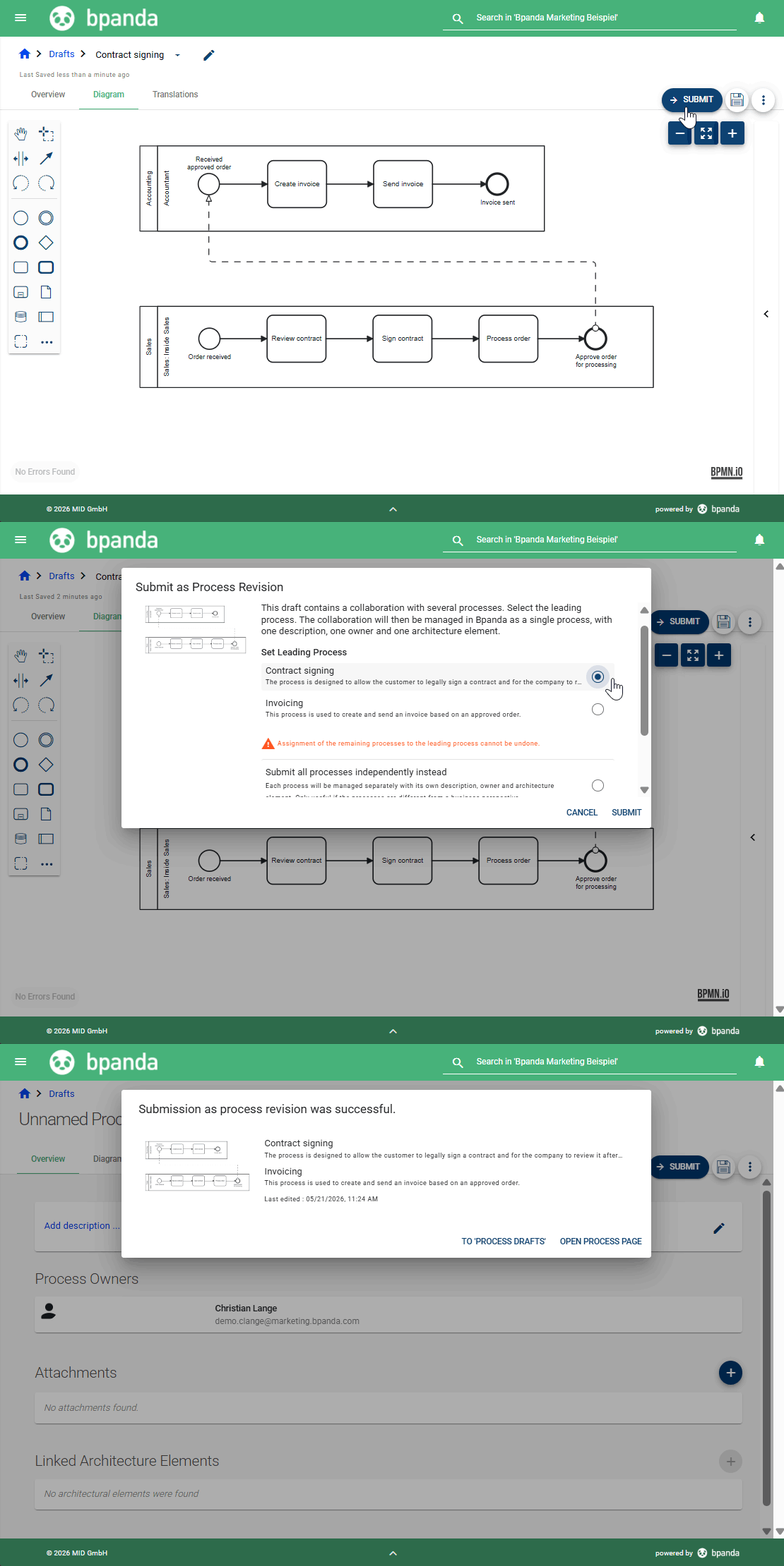
Bpanda now provides even better support for collaborations with multiple processes; you can now decide whether you want to submit a process draft with a collaboration as one process or whether you want to submit all processes separately. We recommend merging your collaboration processes which were previously managed separately and treating them as single processes with common process information. To do this, simply open a process with collaborations as a draft. Once you submit this as a new process revision, then you can decide which process should be the leading process. This then becomes the new name of the merged processes. We recommend that you hide the process you no longer require in the collaboration so you don’t get confused; it will no longer have any subsequent versions.
Architecture: Only ArchiMate®-Compliant Relationships Possible
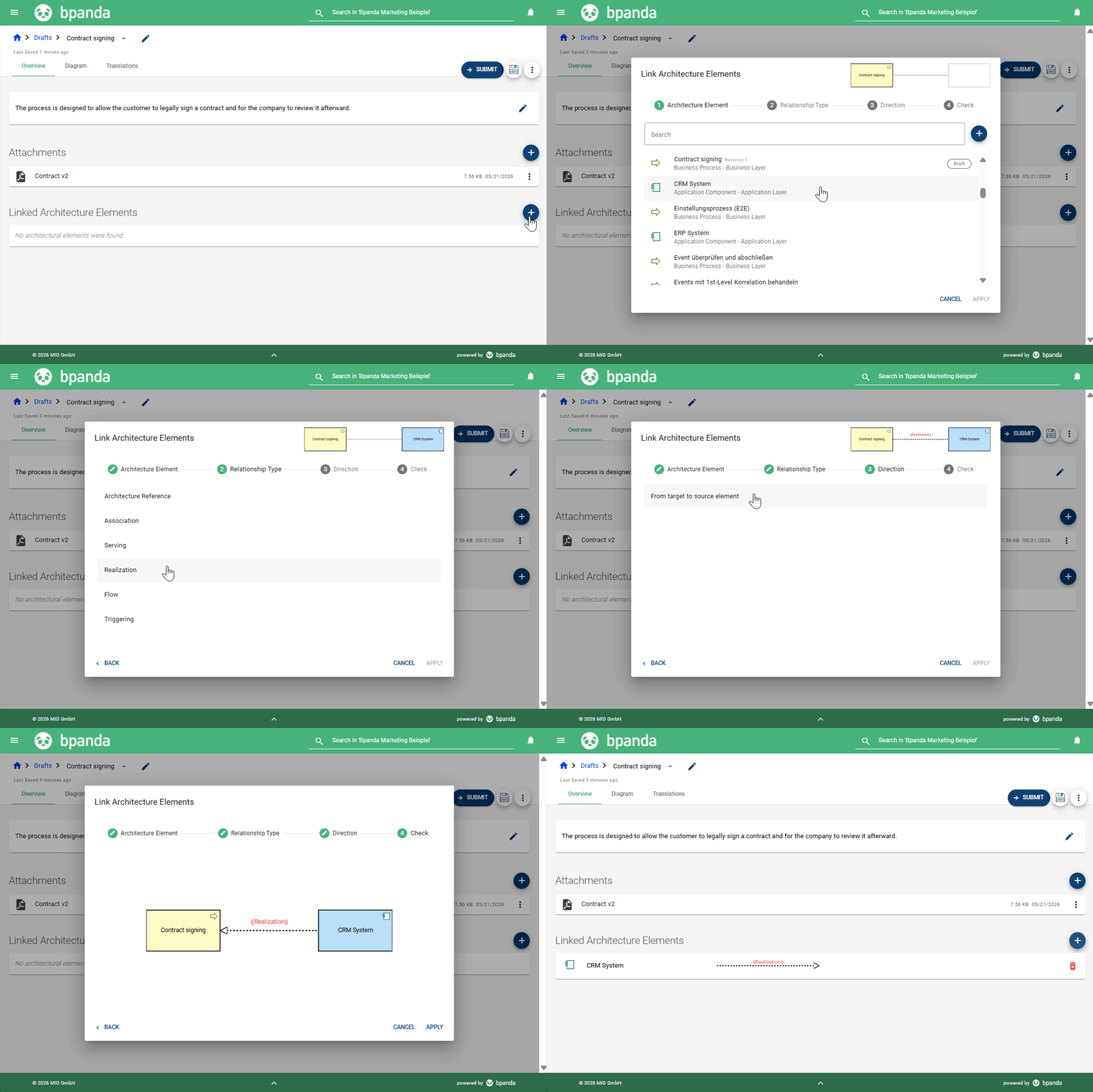
A recent introduction to Bpanda has been linking processes with architecture elements. As is the case with BPMN 2.0, we use the industry standard ArchiMate® as our process language. Linking an architecture element you created in Bpanda opens a new and improved dialog for adding relationship types and direction to the relevant element. Only relationship types permissible for the selected element are shown. Bpanda makes it easy to guarantee all your links are ArchiMate®-compliant.
Architecture: Creating Processes
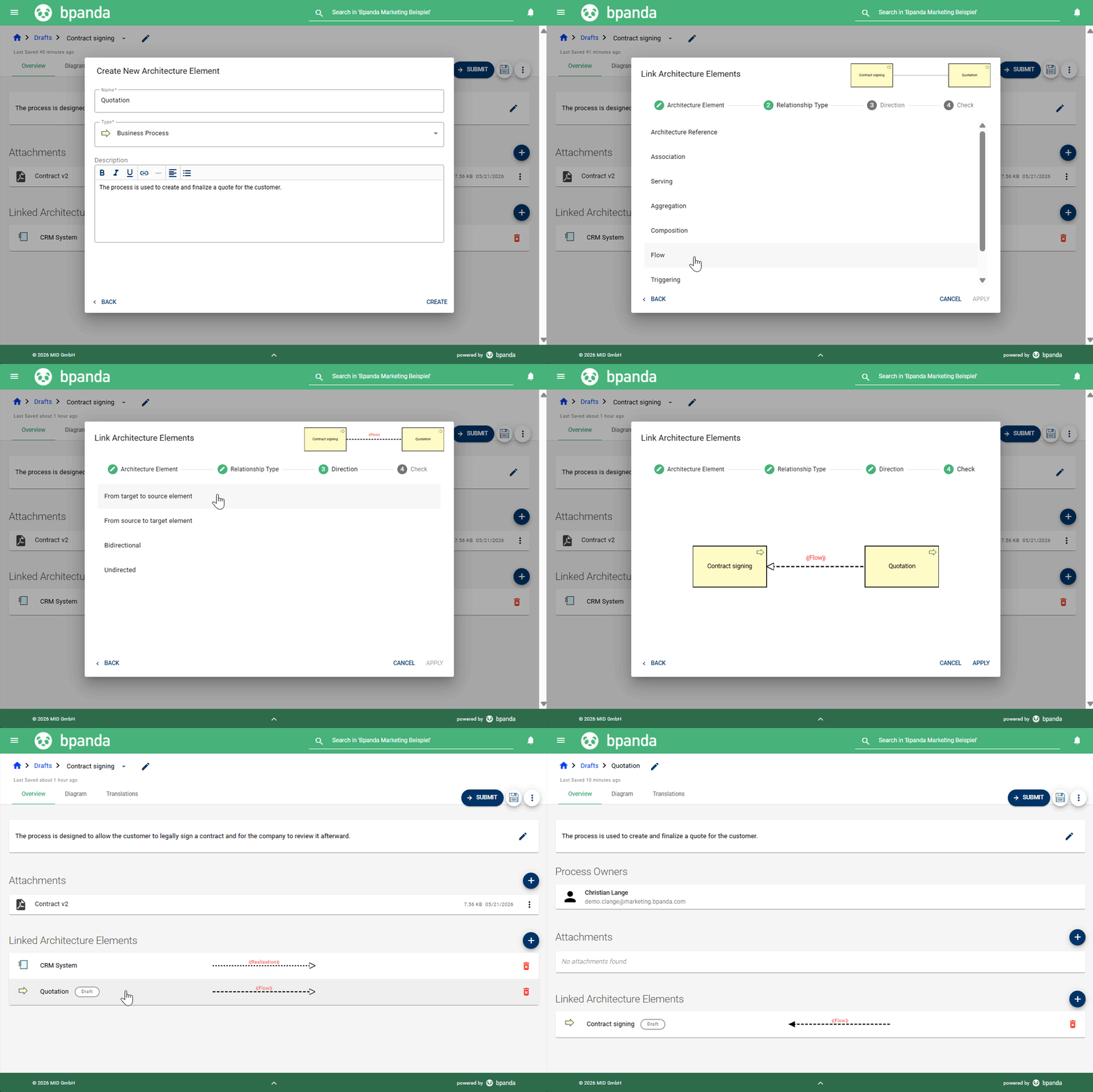
Processes are normally created in Bpanda using process drafts. Process Owners and Architecture Owners can now also create processes as a new architecture element. Simply enter the name for the process and select the “Business Process” type. You can add a process description directly in the dialog and link the process with other architecture elements. This is a great way to quickly create lots of (or all) processes from an architecture perspective which you can add details to at a later stage with the respective Process Owner.
Architecture & Processes: Displaying Relationships for Linked Elements
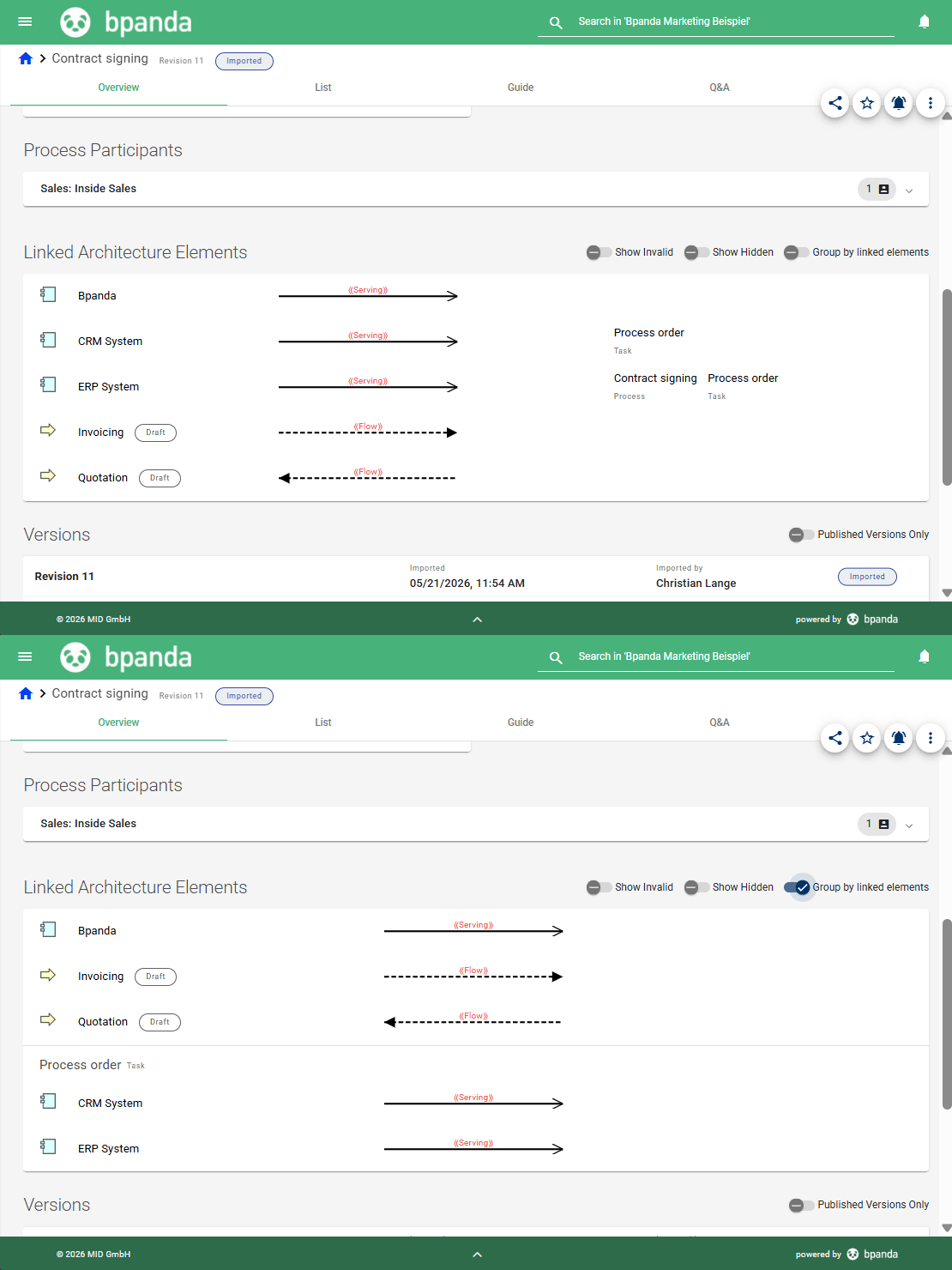
A process or architecture element’s description now contains information about which relationship type and which direction the respective element is linked with other elements; this information can be found in the “Linked Architecture Elements” section. To understand the relationship. imagine that the opened architecture element or process is to the right of the relationship and the relationship flows in the direction of the arrow. The architecture description also contains two new filter options for filtering the list of links. You can filter by invalid or hidden architecture elements. You can also group linked elements in the process description.
Architecture: 2 New Reports
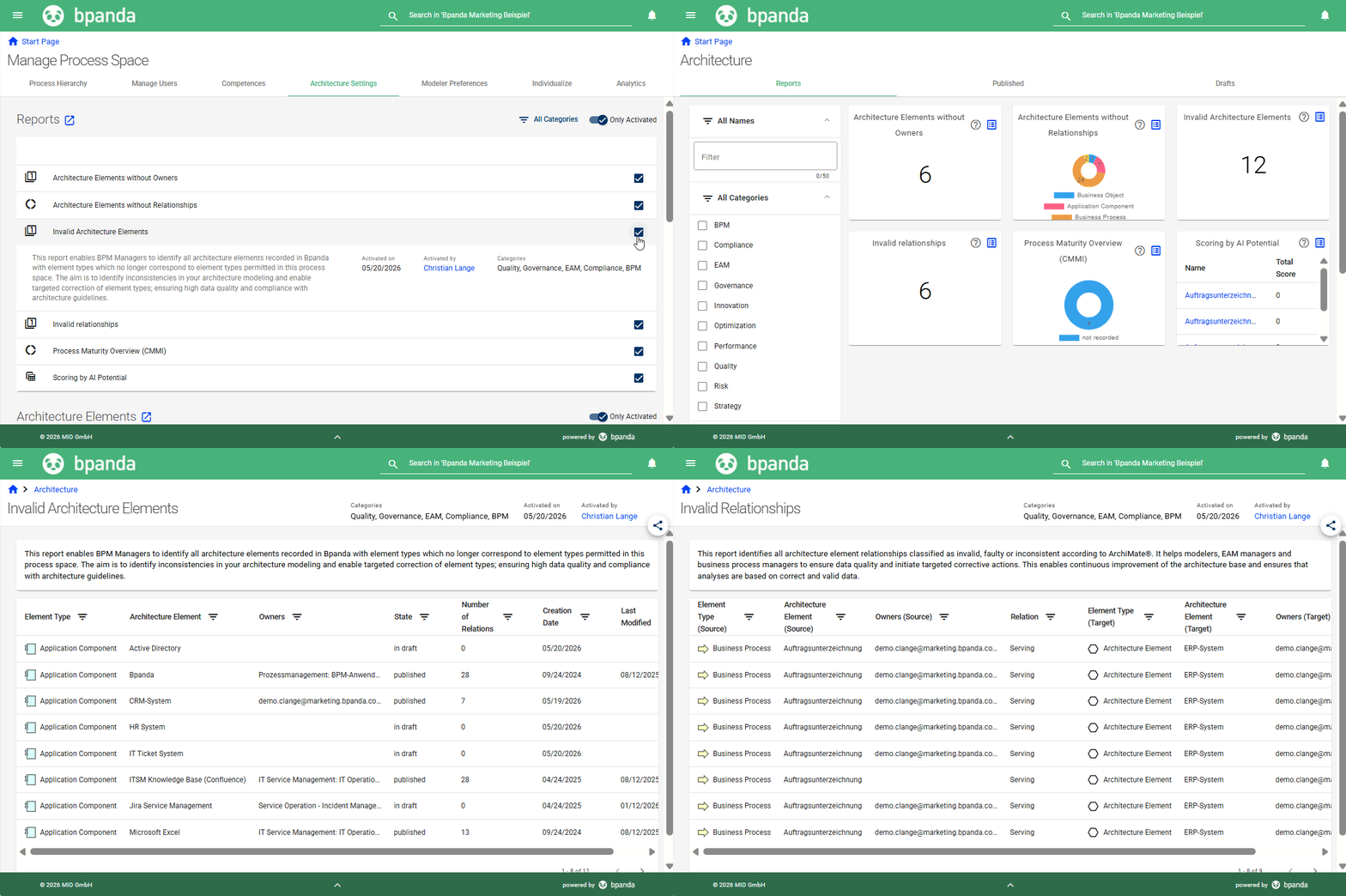
This release brings with it two new reports for your architecture dashboard: “Invalid Relationships” and “Invalid Architecture Elements”. Both reports alert you to current vulnerabilities in your process space so you can respond quickly and fix any irregularities. These two new reports complement the existing 14 reports. BPM Managers can activate these reports under “Manage Process Space” in “Architecture Settings”. The Bpanda Online Help contains detailed information about all reports and their purpose.
Architecture: ArchiMate® Import
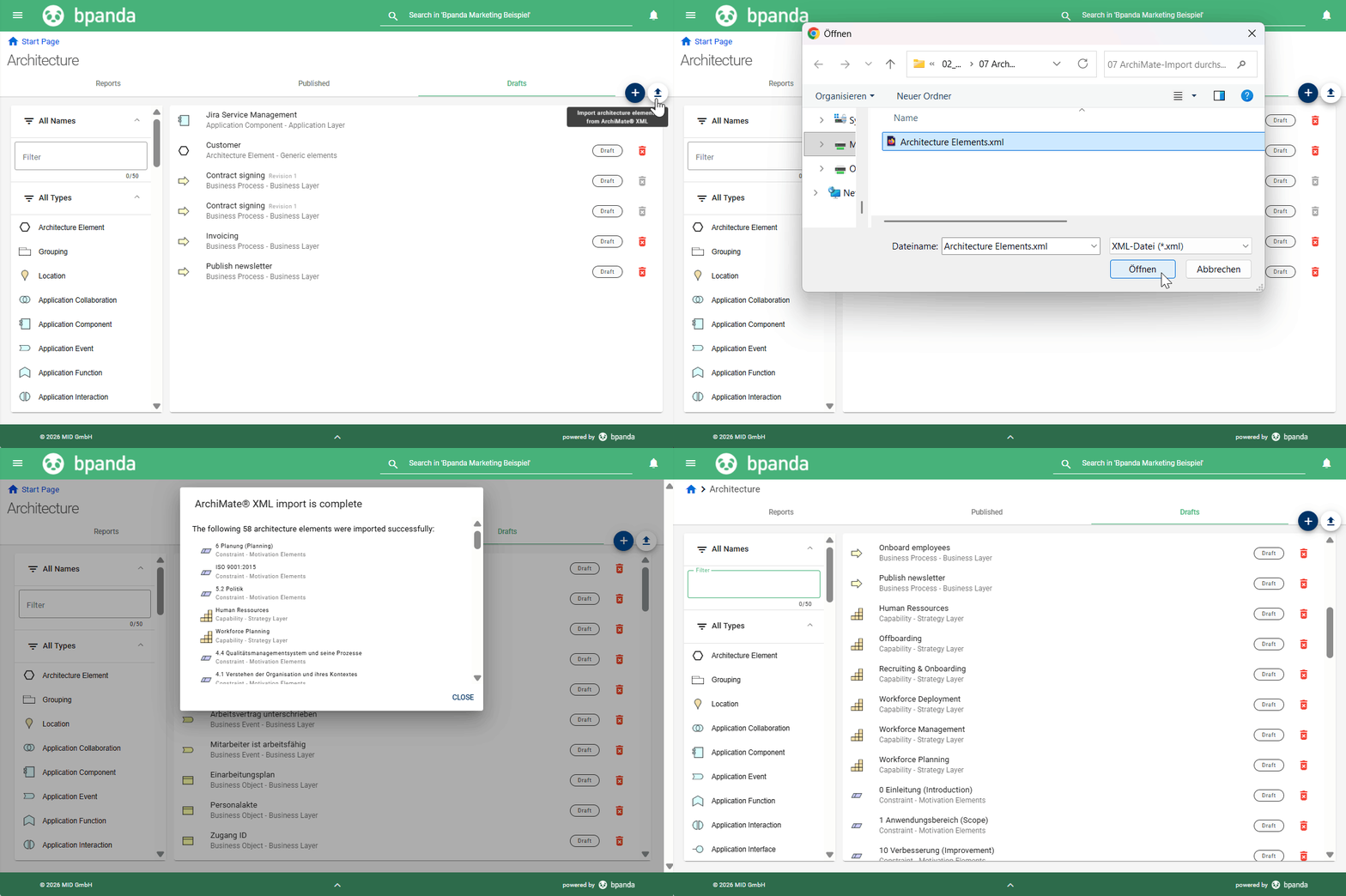
As announced in the last release, you can now import architecture elements into Bpanda. You can find the ArchiMate® Import in the Drafts tab in the architecture area. BPM Managers and Process Designers can simply click the upload button to import ArchiMate® XML files to transfer an existing architecture landscape into the process space. Please note that Bpanda only imports architecture elements (including relationships) that you have permitted in your process space. You can find all imported architecture elements under Drafts. This lets you check whether the import was carried out correctly and then publish the elements. You can also use the import to re-upload your XML file if there have been more significant changes.
Architecture: Bpanda-Innovator Connector
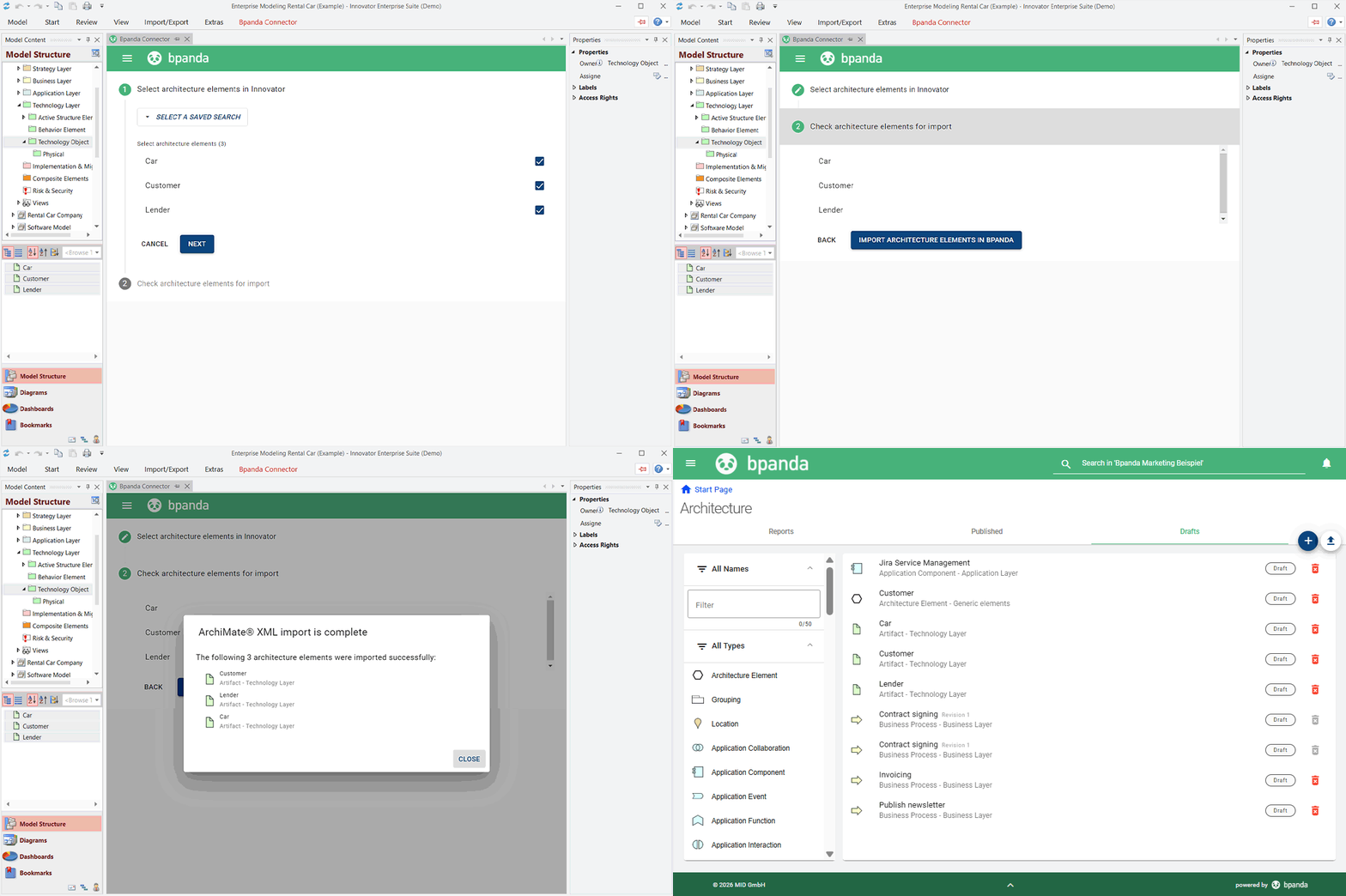
If you also use Innovator as well as Bpanda and have an active architecture landscape there, you can now import your created architecture elements to Bpanda via the Connector instead of recreating them. Select the architecture elements you want to import; both the elements and the relationships between the selected elements are imported. Each time the elements are transferred again, they are updated (e.g. name changes, new/removed links). Importing processes from Innovator to Bpanda now always includes all architecture elements and relationships linked in those processes. As with the ArchiMate® Import, only elements that are permitted in your Bpanda process space will be imported; check your architecture settings in Bpanda beforehand. You can also add information to the description for imported processes. Whether you can change the modeling still depends on whether you allow imported Innovator processes to be edited in Bpanda. A new hotfix for Innovator for the Bpanda Connector will also be released at the same time as this release.
We have also made a few small improvements and fixed a few small bugs which customers found in this release.
In the detail view of the “Scoring by Digitalization Potential” report, sorting now occurs in descending order according to the total score.
When you print a process diagram in Bpanda or export it as PDF or SVG, there is now an extra option available in the print dialog to include the diagram icons (e.g. icons for attachments or risks). The icons that you have selected by default for your view in Bpanda will be printed. You can change them in the process diagram’s three point menu.
The “Manage Processes” dashboard has received a small design update and now looks significantly more compact, making it easier to take in the information and KPIs. The tile showing hidden processes has been removed. If you want to know how many processes are hidden, you can still find this information in the “Analytics” tab under “Manage Process Space”. You can also use the “Show Processes” action to see how many and which processes are currently hidden in your process space.
According to the BPMN standard, saving names for data associations is not permitted. This is why we have also removed the name field for data associations in Bpanda.
If you had attachments and/or architecture elements attached to data objects and data stores, the information was sometimes not displayed reliably. This bug has been fixed and the attached information is now always saved and visible.
If the Account Manager added a new user to Bpanda in CAMP and that user’s e-mail domain was not included in their configured domain mapping, then the user was unable to log-in to Bpanda. From now on, Bpanda automatically adds the e-mail address (not the complete domain!) with the previously unknown domain to your domain mapping in CAMP. This ensures that all users you invite to Bpanda are able to log-in.
Info: These release notes apply to Bpanda Version 2026.02.