

Want to get started with
process management
in your company?

Implement process management in your company the easy way with 6 key questions

A long-standing, highly committed employee at aMIDzon. As Head of Logistics, he is responsible for goods receipt, the warehouse and just-in-time processes.

Sells consumer goods in Central Europe.
The company has responded to substantial market changes and recently introduced a number of new developments.
Join him live and follow his path to success!
Wolfgang’s story begins with problems you probably know too.
Some of the challenges he faces:
In the video, Wolfgang explains why process management is definitely the answer for his company.
You are currently viewing a placeholder content from YouTube. To access the actual content, click the button below. Please note that doing so will share data with third-party providers.
More InformationWhy do I need process management?
First, learn more about process management and, as a first step, define the goals for your rollout.
Every company pursues different process management goals. Depending on the industry or current challenges, these can also change over time. In addition to your company’s own goals, there are a few fundamental aspects you should always pursue with well-functioning process management. Our video tells you what they are.
You are currently viewing a placeholder content from YouTube. To access the actual content, click the button below. Please note that doing so will share data with third-party providers.
More InformationWhat do I need for a successful rollout?
Unfortunately, process management often fails right at the start, …
… because the project’s time and budget resources weren’t realistically planned, communication is insufficient and/or the group of people involved is too large or too small. To make your process management rollout a success, focus on three aspects in particular:
What does this mean for your role in the company?
The right
mindset
Make sure your management fully supports the introduction of process management and provides you with the resources you need. Process management should be communicated as an opportunity for all employees, not perceived as a threat to individuals.
The right
team
Ideally, start with a small group and expand it steadily as the rollout progresses. Besides management, bring department heads (= process owners) into the team, and ideally also people directly involved in the workflows (= process users).
The right
tool
Instead of building your documentation with Excel & Visio alone, choose a professional process management tool. Find out which features the different tools offer and pick the software that best suits your goals and requirements.
Wolfgang also wants process management to be introduced successfully at aMIDzon, so he spoke to CEO Christian Lange early on. Despite initial resistance due to the time and investment required, he convinced him of the project and got the go-ahead to purchase suitable software for aMIDzon. Web-based, user-friendly and collaborative: the new tool had to meet these criteria.
After extensive research, Wolfgang chose Bpanda from MID GmbH.
Try Bpanda freeNow he’s thinking about how best to put together his project team, so he downloads the skill matrix from MID GmbH.
Find out how to introduce process management successfully together with your employees and colleagues!
Wolfgang’s core team
Since aMIDzon’s current problems mainly affect accounting, shipping and order processing, he decides to bring the heads of these departments into the project team first.
Andrea

As the numbers expert, Andrea handles billing for suppliers and colleagues. She has digitalization firmly under control.
Jürgen

For Jürgen, the customer is king. He makes sure customers receive the products they ordered undamaged and on time.
Samantha

Samantha is aMIDzon’s organizational talent. She manages key workflows such as purchase processing and cancellations.
Where do I start?
Once the strategic aspects of the rollout are clear …
… you’ll want to start documenting your first processes in your software as soon as possible. Before you do, though, take the time to agree on a few ground rules with your core team so that everyone documents consistently later on.
You do this in a method manual.
An internal guideline that creates a shared understanding
of process management in your company.
Method Manual
This document summarizes your company’s entire business process management initiative.
Record the principles, goals and methodological considerations for the rollout here. You should also define key terms so everyone shares the same understanding. This is also where you specify the level of detail for documenting processes by defining the modeling conventions and elements, from the process landscape (including levels) down to the process element. Include information on process management roles and your process management software as well.
Modeling Conventions
These are an important part of the method manual, because this is where you define all the standards for modeling your processes, so documentation is consistent and people don’t just do what they think is right.
Among other things, specify the modeling direction (traditionally left to right, for example) and how processes or process steps may be named (e.g., noun + verb). You should also specify which elements are allowed on which process levels.
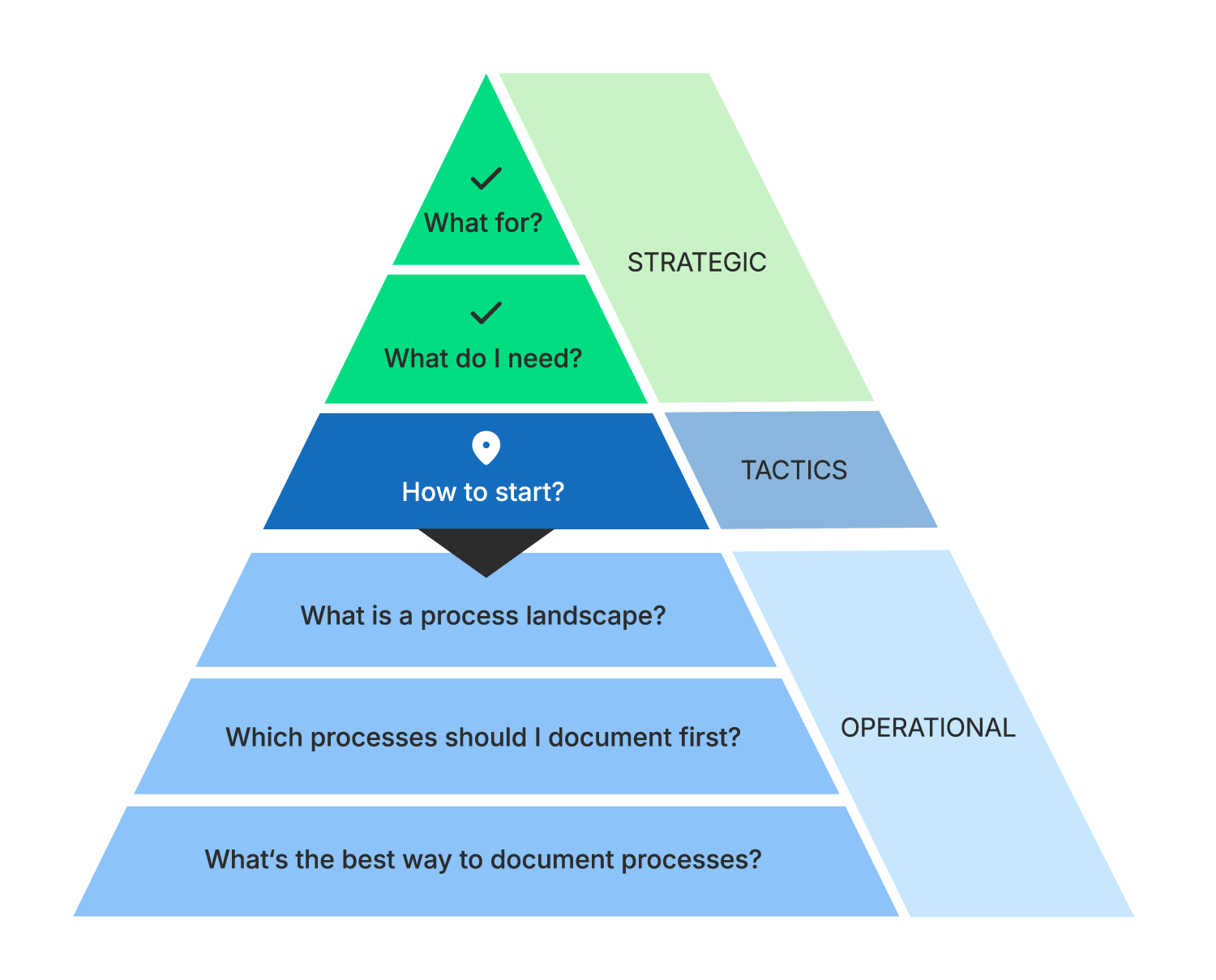
Since consistent process documentation is very important to Wolfgang, he first wants to record everything important in a method manual.
At this point, Wolfgang gets help from the experts at MID GmbH. Since he bought his Bpanda licenses together with a process management onboarding package for aMIDzon, he simply uses his “Basic rules” module.
Try Bpanda freeAfter a successful workshop with his core team, Wolfgang has clearly defined the following aspects, among others, in a method manual (excerpt).
aMIDzon’s processes are to be documented
hierarchically on four levels.
Overview of the entire company, incl. management, core & support processes
Relationships between business processes
Business processes
Subprocesses
In summary
They also agreed that aMIDzon will use these roles for now:
What exactly is a process landscape?
Method manual – check. Let’s keep going!
Now you can finally get started with process management in practice. The first step is to create a process landscape for your company. What exactly is that? Roughly speaking, your process landscape contains all your company’s processes and uses Process Maps to structure them logically across the different levels (Level 0 to Level xx). This puts your processes into a hierarchical order and creates your process hierarchy.
The process landscape is shown in one or more linked Process Maps. A Process Map is a visual representation of your processes, grouped by topic on each level. It shows how individual processes relate to each other. The Process Map on Level 0, for example, gives you the most compact overview and traditionally shows your management, core and support processes. Think of it as a kind of navigation aid that lets you easily navigate top-down to the subprocess.
In the following video, we explain how process landscape, Process Maps and levels fit together with a short, clear example.
You are currently viewing a placeholder content from YouTube. To access the actual content, click the button below. Please note that doing so will share data with third-party providers.
More InformationHow you map your process landscape is up to you.
Some process management tools let you create Process Maps directly in the software, others let you import them as an image. In general, there’s no right or wrong when it comes to how your process landscape looks, because it’s individual and differs from company to company!
Here are three examples of how different process landscapes can look:
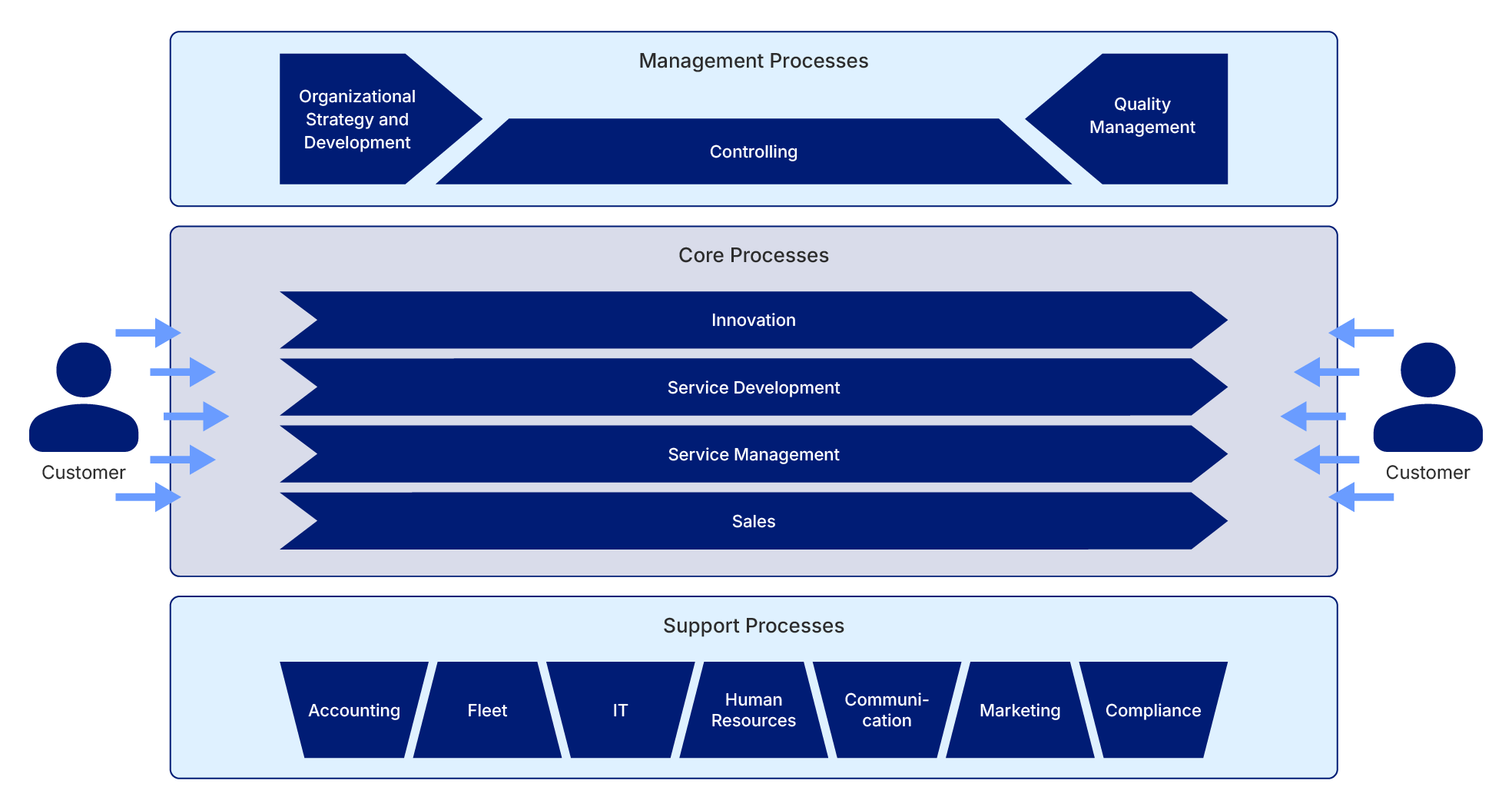
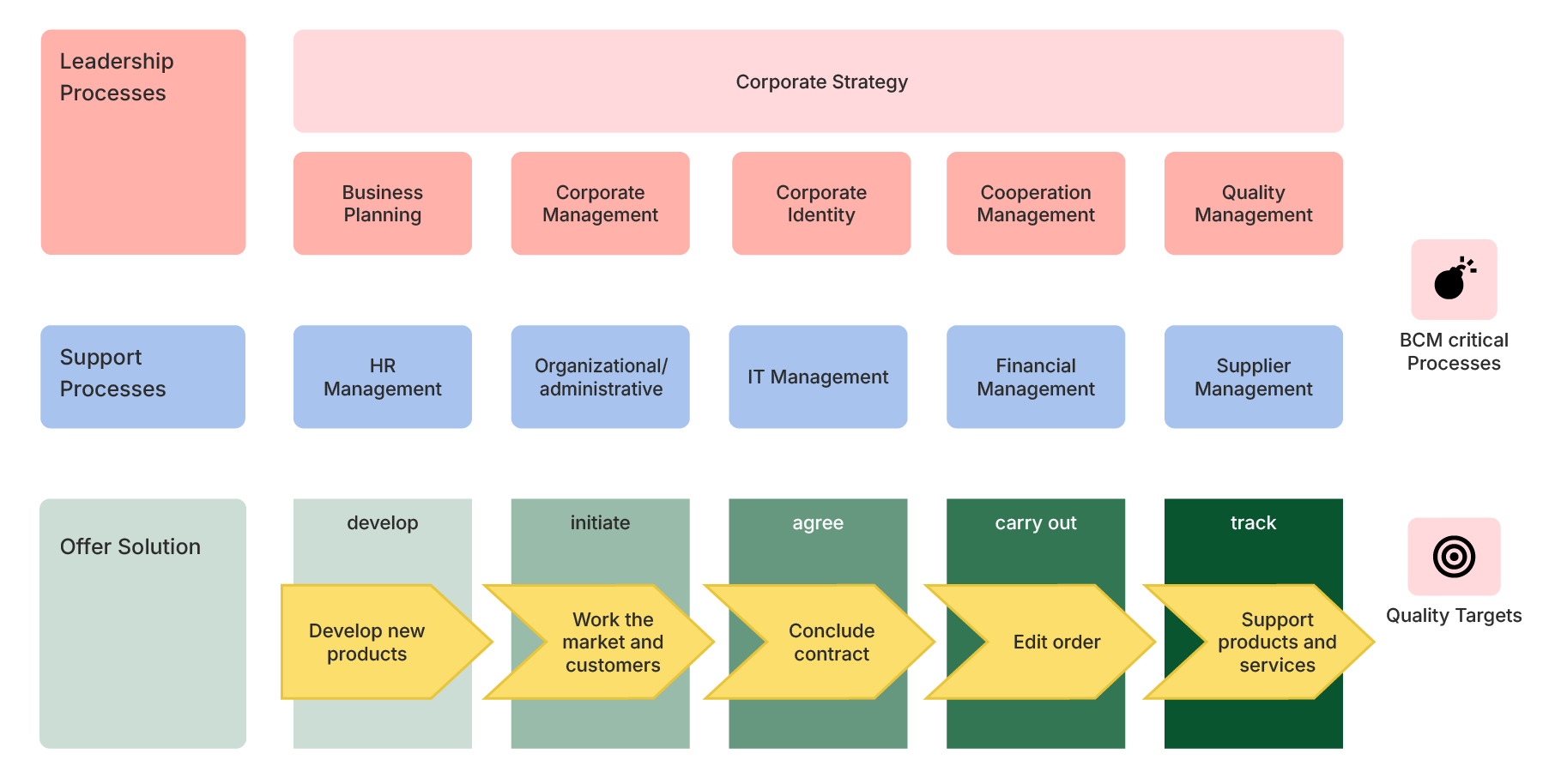
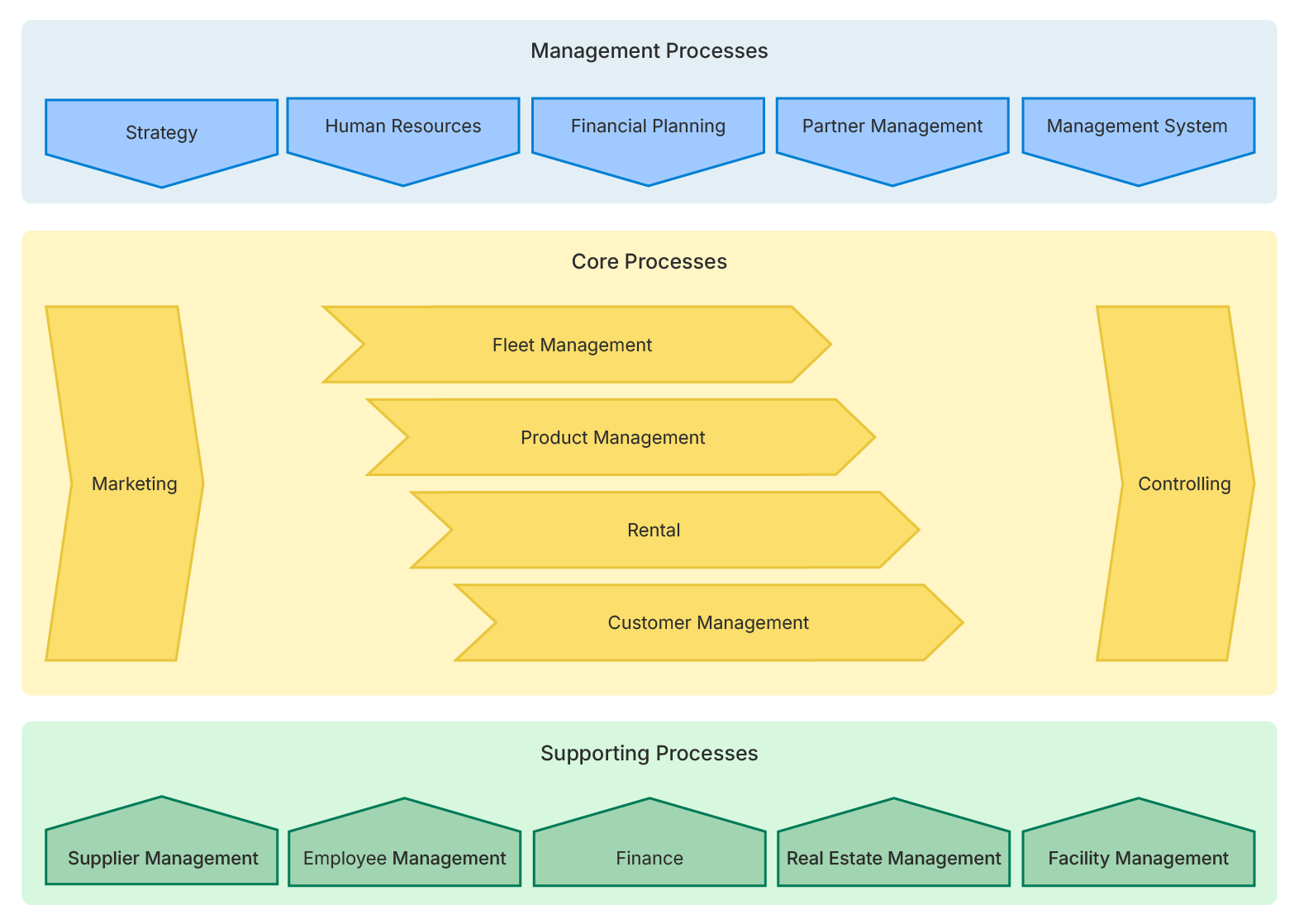
Wolfgang now also faces the task of representing aMIDzon’s processes hierarchically using Process Maps.
Knowing that this is a very important step in introducing process management and that he has never created a Process Map before, he decides to get help.

Hofmann-Eisentraut
Katja is a process consultant at MID GmbH. She can explain to Wolfgang how best to approach the process landscape methodically.
Katja advises him to
proceed in four steps

Brainstorming
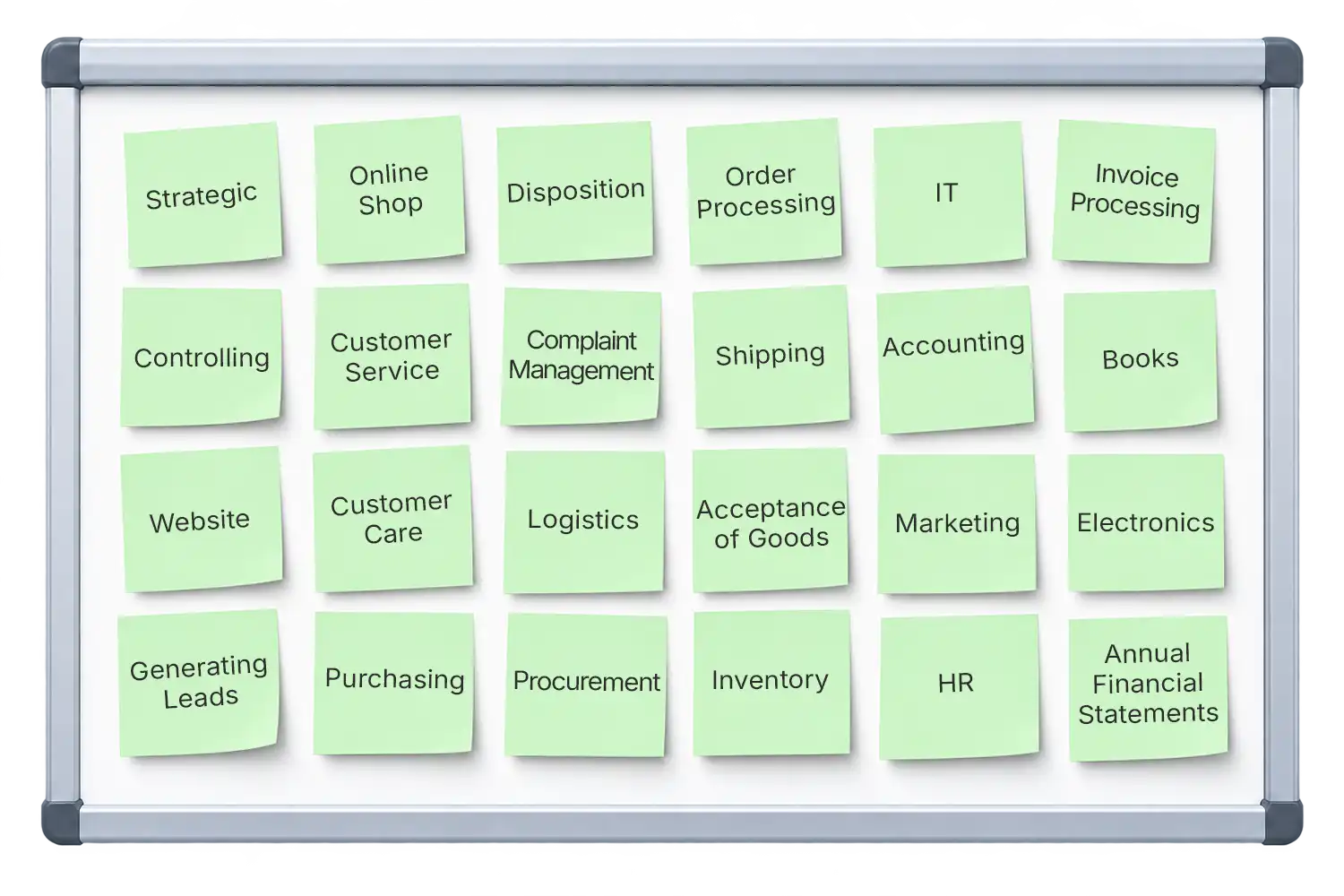
That’s exactly how Wolfgang wants to proceed. He schedules a meeting with his core team and CEO Christian Lange to discuss which processes exist at aMIDzon. As input, they use existing Word and Excel documents, some of which already describe aMIDzon’s workflows. During the brainstorming, they think of further processes that haven’t appeared in any document yet. Wolfgang writes each process on a separate Post-it and sticks them all on a whiteboard. At the end of the brainstorming, the five of them are quite surprised at how full the whiteboard has become.
Clustering the rocesses
Now Wolfgang wants to divide the processes into management, core and support processes. First, he explains the difference between these three process types to the others again:
are the steering processes that set aMIDzon’s strategic direction.
on the other hand, are value-adding processes, i.e. those aMIDzon earns money with.
are value-securing processes that keep aMIDzon running.
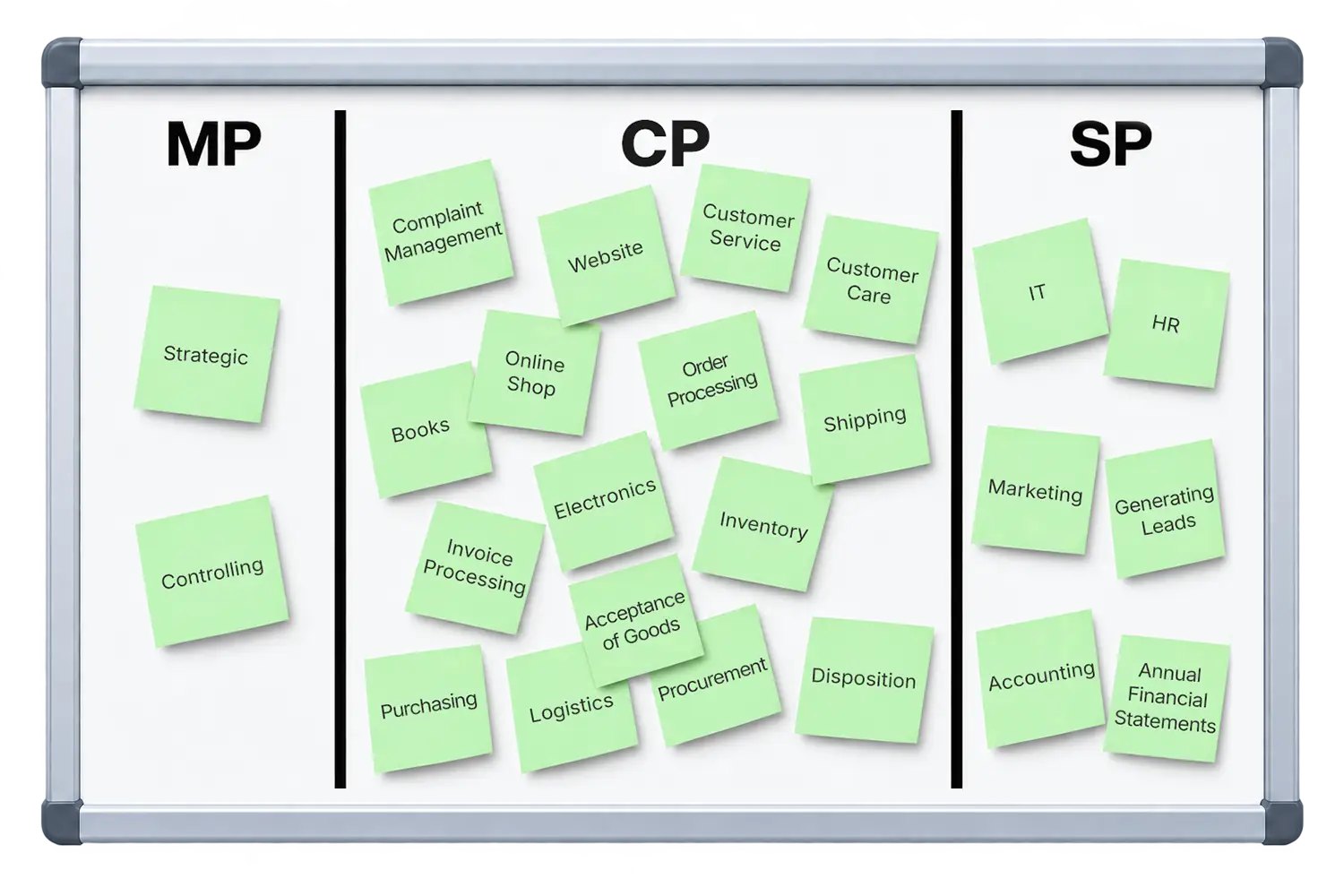
Wolfgang then divides his whiteboard into three areas, and together they discuss where each process belongs. Wolfgang makes sure that the clustering really focuses on the processes and doesn’t call into question the importance of (support) departments. In the end, they have not only divided the board into the three areas but also placed the first processes hierarchically below others. Wolfgang knows that these are certainly not all of aMIDzon’s processes yet, but it’s a very good first version to work with.
Creating the Level 0 Process Map
They did it, and Wolfgang is more than thrilled with the result of the joint discussion. Even though the team took a little longer than planned, the time was definitely well spent. Everyone contributed and helped create more transparency for all. As a result, Andrea, Jürgen, Samantha and Christian Lange learned more about the processes and their interdependencies across departments. A win-win for everyone!
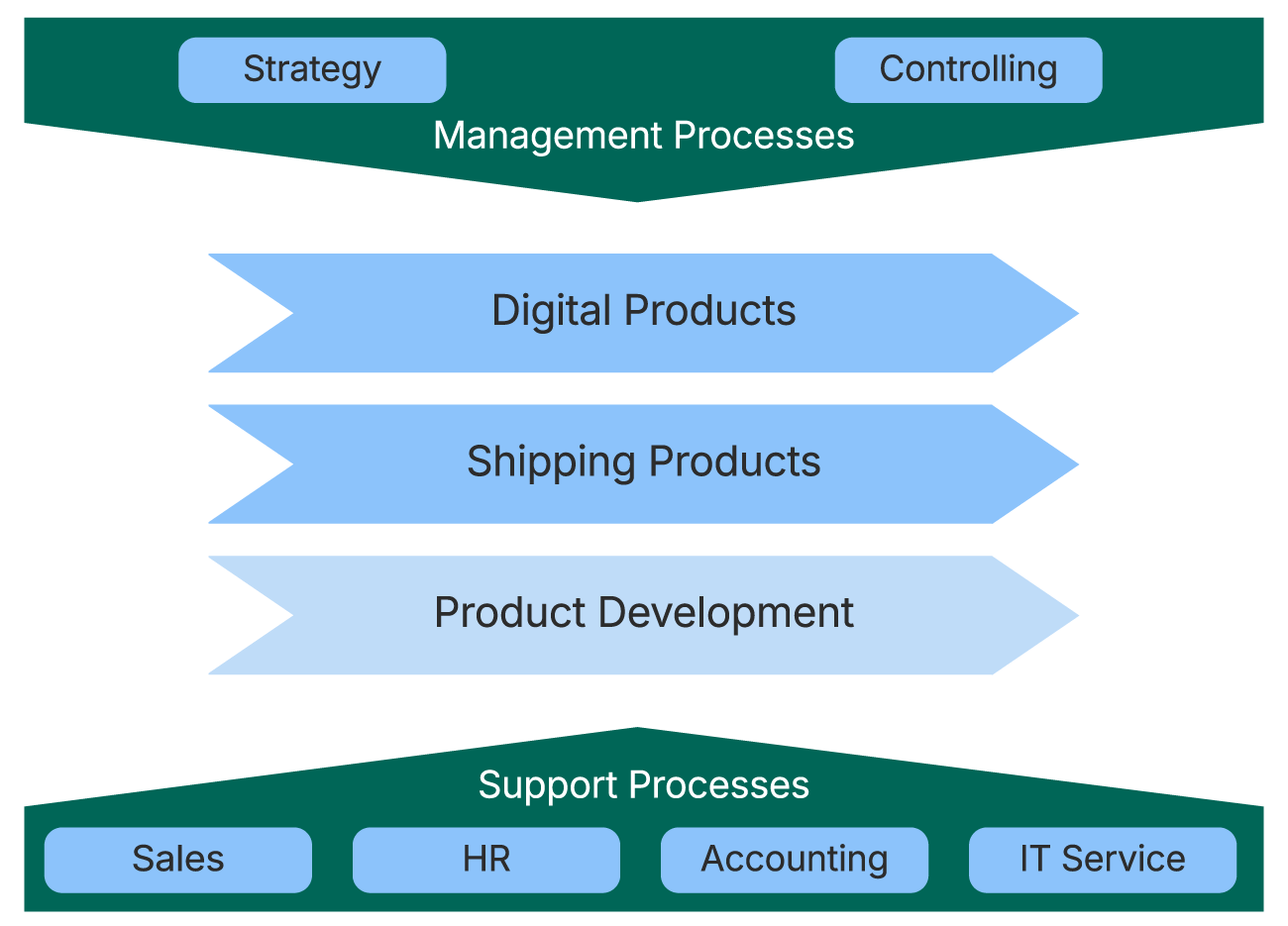
Now Wolfgang gets to work creating aMIDzon’s Level 0 Process Map in Bpanda. He decides to show the management processes as the upper frame and the support processes as the lower frame, with all core processes in the middle. After some focused work, Wolfgang proudly presents his first Process Map, which gives a compact view of aMIDzon’s process landscape. He publishes it directly in Bpanda so that his core team can see it too.
Creating the Process Maps below
Equipped with the top-level Process Map, Wolfgang looks at the results of the brainstorming and clustering again. He realizes that, for now, he can create at most a few Process Maps for Level 1 of aMIDzon’s process hierarchy. From the first hierarchical arrangement of the Post-its, he knows which processes belong to which areas. However, he doesn’t know exactly what the processes and subprocesses look like, as only the process names are on the Post-its. Only once the processes (Level 2) and subprocesses (Level 3) are mapped with their individual steps (from question 6 onward) will aMIDzon’s process landscape be complete.
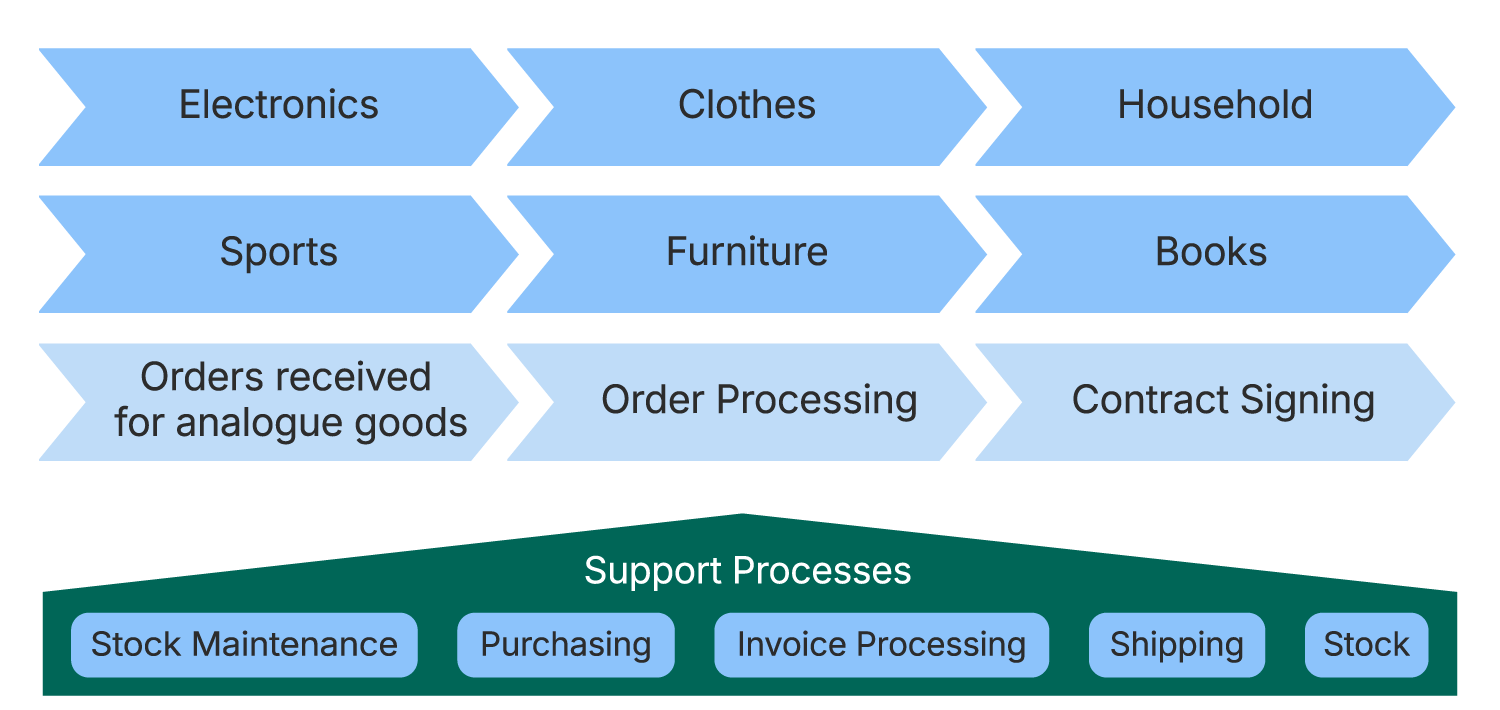
Wolfgang shows his team the current status and reminds them that these Process Maps are version 1 at this point. Since process management is being newly introduced, every additional process captured is another piece of the puzzle that will complete the overall picture of what happens at aMIDzon.
The Process Map is a “living” document that develops along with Wolfgang and the progress of the process management rollout. So many more versions will follow this first one. That’s the only way to create process documentation that is always up to date and truly lived.
Which processes should I document first?
By creating your Process Map, you already have a selection of processes to document. Now you need to decide which processes to start with.
Of course, all processes are important, which doesn’t make the decision any easier.
But you can’t document them all at once. To avoid getting bogged down and losing unnecessary time, you should set a focus.
Identify a few critical processes
and start with those.
There are several approaches and perspectives on which processes these could be for you.
You can probably think of processes right away that keep causing problems.
Maybe workflows, process steps or responsibilities have changed and not everyone has noticed.
After all, these processes can’t run well if many people don’t know about them.
Particularly problematic processes are often also urgent. If they’re the main reason you’re introducing process management in your company, you should document exactly these processes first.
Critical processes can also be those that keep sparking a lot of discussion. This slows down execution and may even cause missed deadlines.
That frustrates not only your own employees but also your customers.
Satisfaction suffers and customer complaints increase, which of course hurts the business. The same can happen with processes that involve many different people or departments.
If collaboration and the handover of process steps don’t run smoothly, this often leads to unnecessary delays and confusion.
Sometimes departments even end up blaming each other.
You should prioritize these processes too.
Wolfgang is also considering how to proceed.
He immediately thinks of several processes that are currently causing problems.
There have been so many changes at aMIDzon recently: the launch of the online shop, the additional location, the new warehouse locations for shipped products and, on top of that, the significant rise in customer complaints.
The more he thinks about it, the more processes end up on his top-priority list.
One moment he wants to start with the processes that have changed, the next with the familiar ones that are currently running poorly. Not so easy.
- that keep causing problems
- that always spark a lot of discussion
- with many unclear steps
- that are in focus and critical
- that have many interfaces
Wolfgang isn’t getting anywhere like this. He now has an ever-growing list of possible first processes, but he’s just going around in circles.
Watch how he went on to identify aMIDzon’s first four processes, which he will document in the next step.
You are currently viewing a placeholder content from YouTube. To access the actual content, click the button below. Please note that doing so will share data with third-party providers.
More InformationHow do I best document processes?
So now you know which process you want to start with.
To document this and all other processes in your company successfully, you need two more things:
and
Knowing what the process actually looks like.The ability to document processes
Of course, there’s more than one way to document processes. In fact, there are surprisingly many, from everyday tools like Visio, Excel and Word to professional modeling languages such as EPC or BPMN 2.0.
In the end, the choice is yours.
Business Process Model and Notation
BPMN 2.0 is the current industry standard for the graphical representation of business processes and is supported by virtually every modern process management software. Why should you document your processes with BPMN 2.0? Because it offers three clear advantages:
A common
language
BPMN 2.0 consists of a defined set of expressive elements. Because everyone has the same elements available when documenting, processes are always represented the same way. This common language provides clear rules with little room for individual interpretation and misunderstandings. That way, you build consistent, transparent documentation.
Intuitive
to understand
The graphical representation with BPMN 2.0 makes it much easier, especially for employees with no previous process management experience, to “read” and understand the workflows shown. The information is presented together in one place, so nobody has to check two lists and three Word documents.
A basis for für
exchange & automation
More and more companies rely on BPMN 2.0 as a common process language, so you can benefit from best practices too. Technically, this process language is based on the BPMN XML format, which you can use to exchange data with other process management tools and for possible process automation later on.
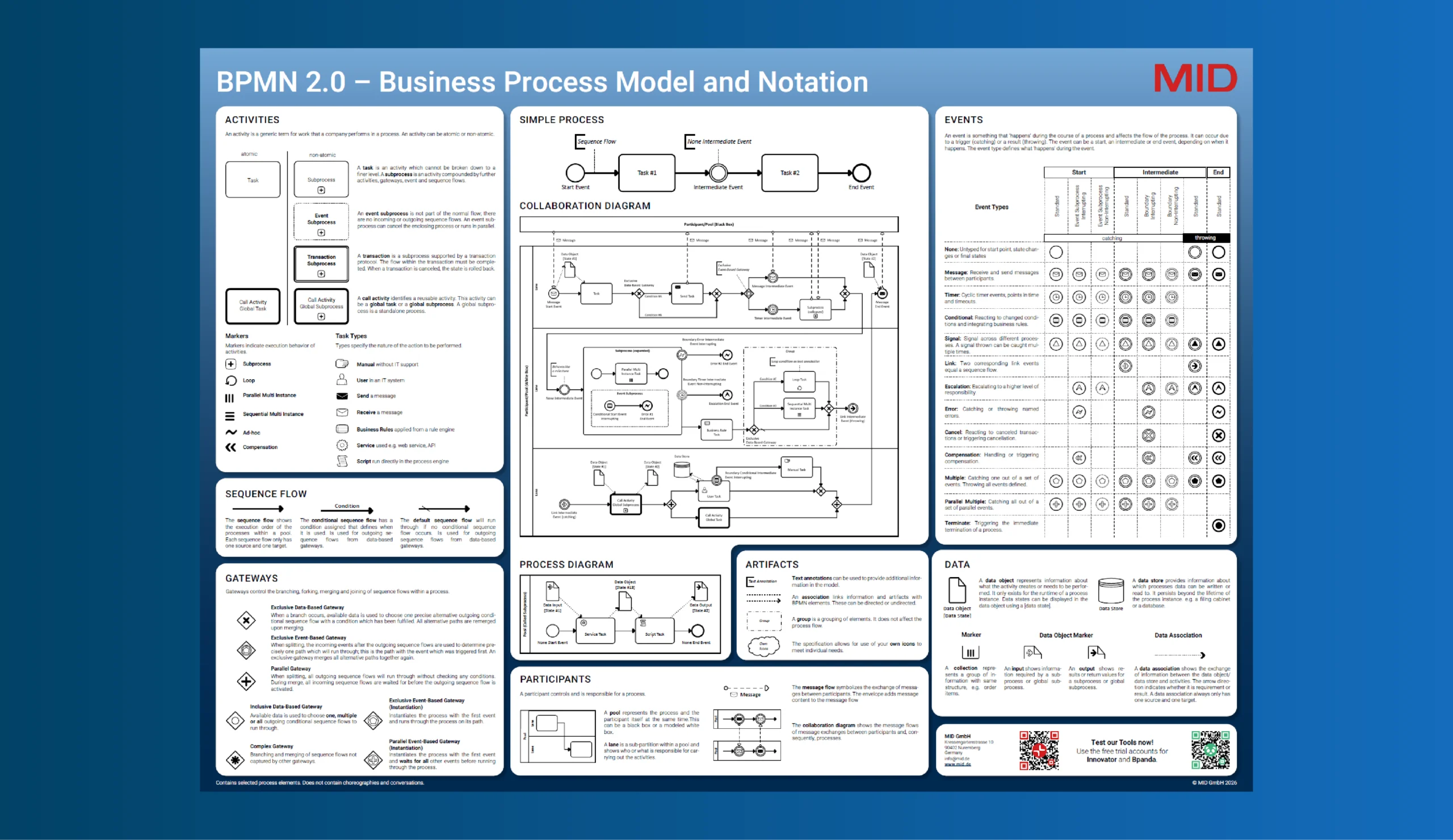
You can find an overview of the BPMN 2.0 elements in comprehensive posters such as the
BPMN 2.0 poster from MID.
To use BPMN correctly …
… you need to know how to use each element correctly in each situation and how to connect the elements in the right context.
The best way to learn this is in a professional training.
Training focused on an introduction to BPM
Get to know the elements Apply the elements in practiceIf you want to establish process management in your company professionally and for the long term, you and your core team need to know what you’re talking about. Without expertise, your colleagues and managers won’t take you seriously, and you’ll find it hard to convince them of the benefits of a process-oriented company.
Knowing what the
process looks like
Once you’re comfortable with BPMN 2.0, you need to find out how the process you want to document actually runs: which steps it consists of and who is responsible for each step.
To do this, you need to sit down with both the person responsible for the process and the people who actually carry it out. Discuss together, in a kind of process interview, how the process really works instead of having everyone send you a document.
Otherwise, you risk receiving 10 different versions of a process – and how are you supposed to know which one is correct?!
Before the process interview, tell the other participants clearly what the goal of the meeting is and ask them to come prepared. This makes the discussion more concrete and productive.
If some form of process documentation already exists in your company, even if it’s just a few lists or simple process descriptions, it certainly doesn’t hurt to bring it along as a basis for discussion.
At the start of process discovery, you should also decide whether you want to capture the current state of the process (AS-IS process) or its optimal flow (TO-BE process). It’s often easier to start by documenting the as-is process. This is quicker and helps you create the missing transparency in the short term. Once that’s in place, you can gradually change the process toward the to-be process and optimize it.
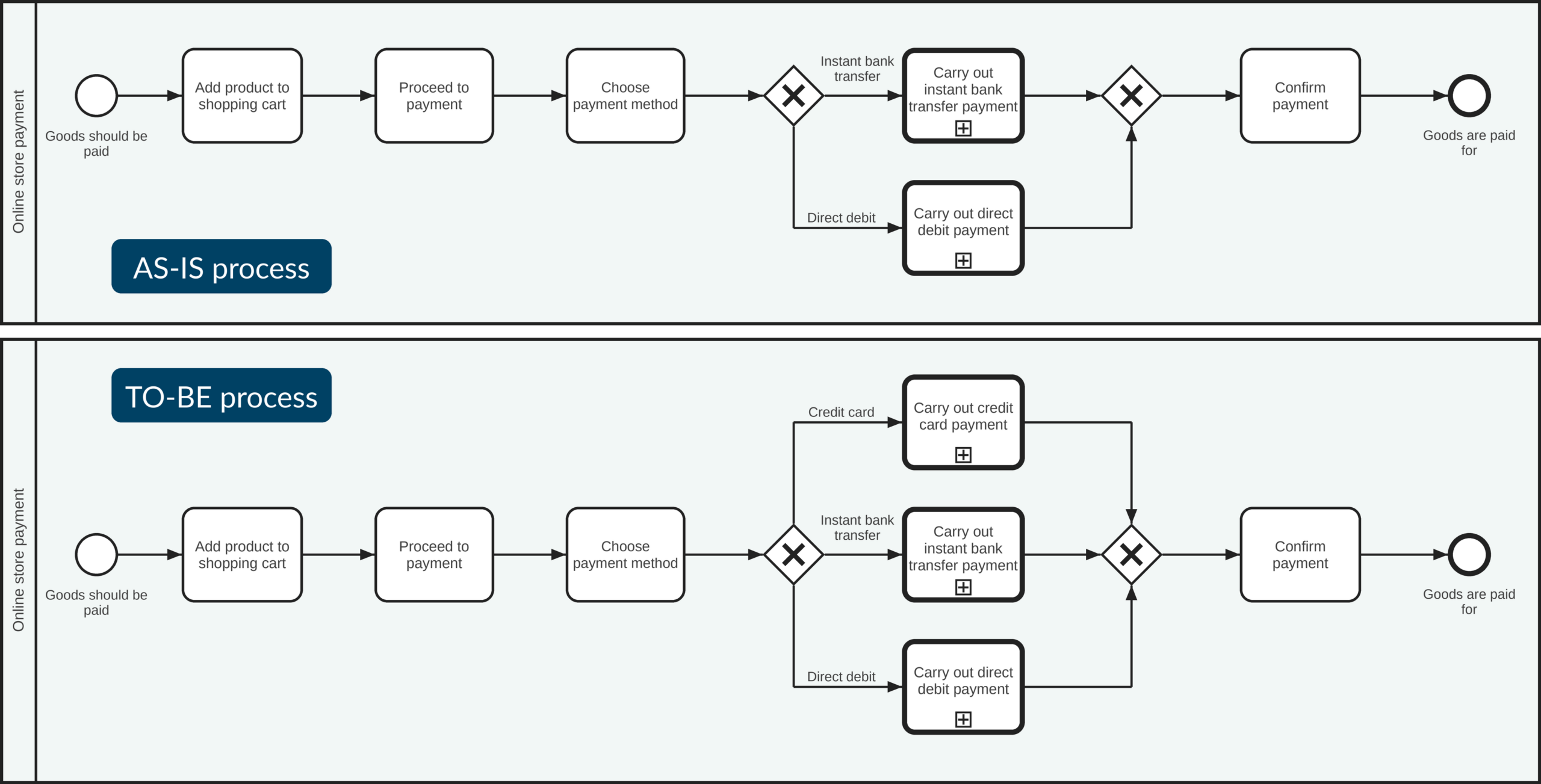
The Happy Path is the “happy run” of a process: the simplest, most straightforward description of the process without branches or special cases – essentially its basic framework.
This framework should cover three pieces of information: title, description and owner for each process step. That’s enough to map the core of the process graphically with process steps (tasks) and responsibilities (lanes) – a perfect basis you can then expand step by step with specific BPMN elements such as gateways or events.
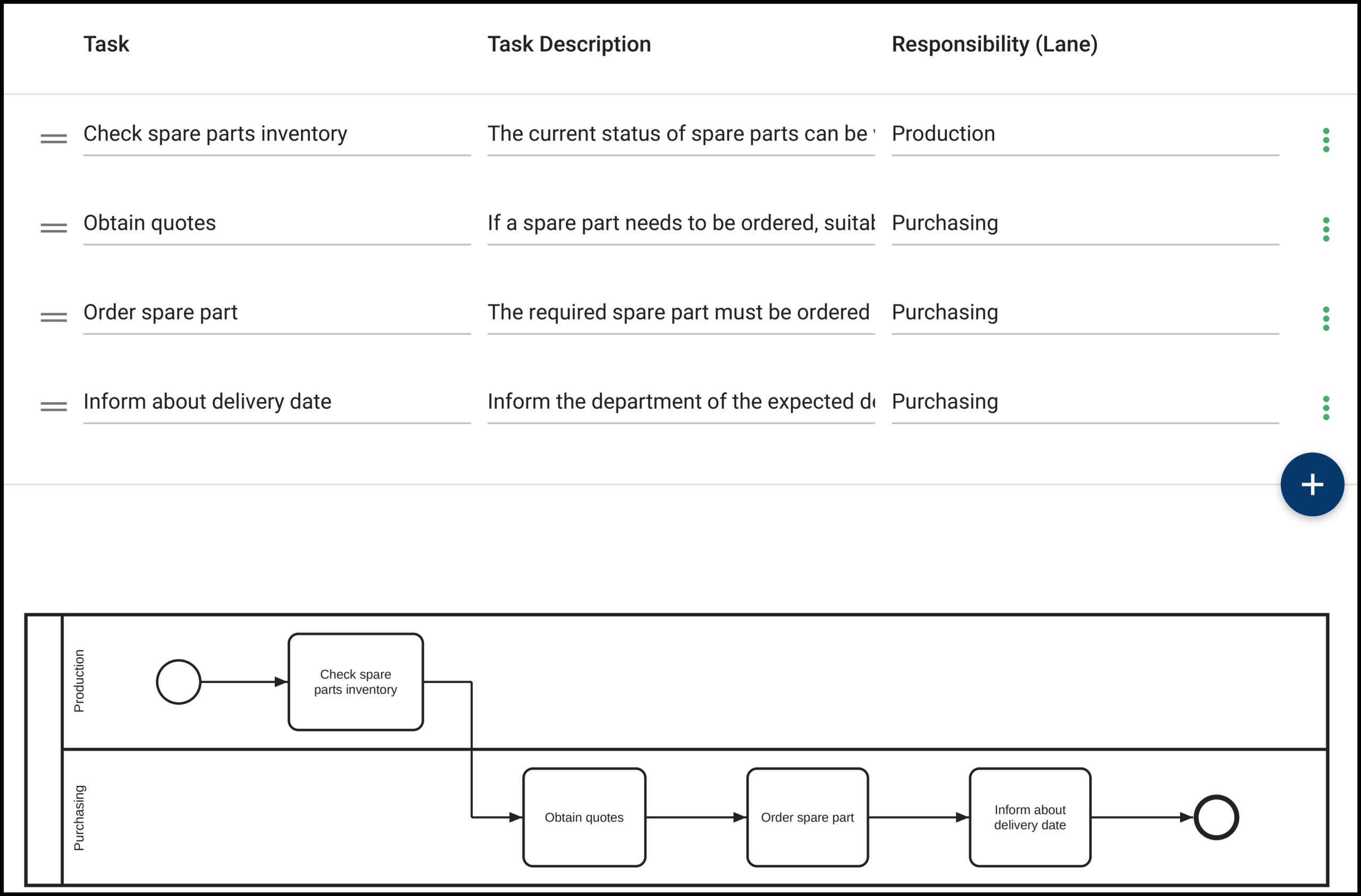
His process management software, Bpanda, offers him three options that build on each other.
Text description
Wolfgang can describe processes using text only. A Process Overview is then created automatically for each process, which he can expand with further information such as owners and attachments.
Happy Path
He can use the Happy Path Editor to create the process framework easily by filling in the title, description and owner as if he filled a simple table.
Modeler
Then there’s the Modeler, which Wolfgang can use to map or extend the process completely with BPMN 2.0 elements.
Since Wolfgang has opted for professional process management with BPMN 2.0 and will initially be mainly responsible for process discovery and documentation at aMIDzon, he decides to first acquire the skills he needs for the Modeler.
Together with his core team, he attends a BPMN 2.0 course at MID and completes a training for process modelers.
Docu Guide
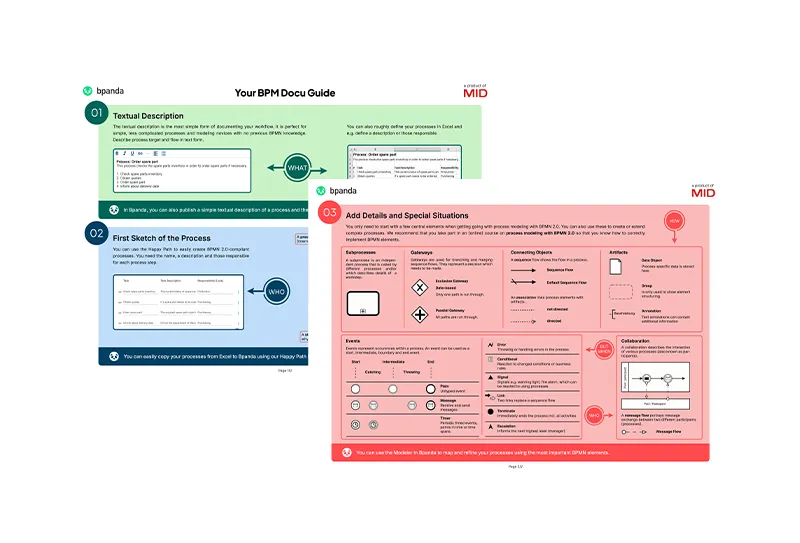
In the training, Wolfgang learns about all the BPMN elements, but he’s also told that a small set of elements is enough for an easy start to process documentation. The BPM documentation guide “Your BPMN process in 3 steps” gives him a good overview of the key BPMN elements for a step-by-step start in the world of process documentation.
Benefit from our free BPM documentation guide too and download it now!
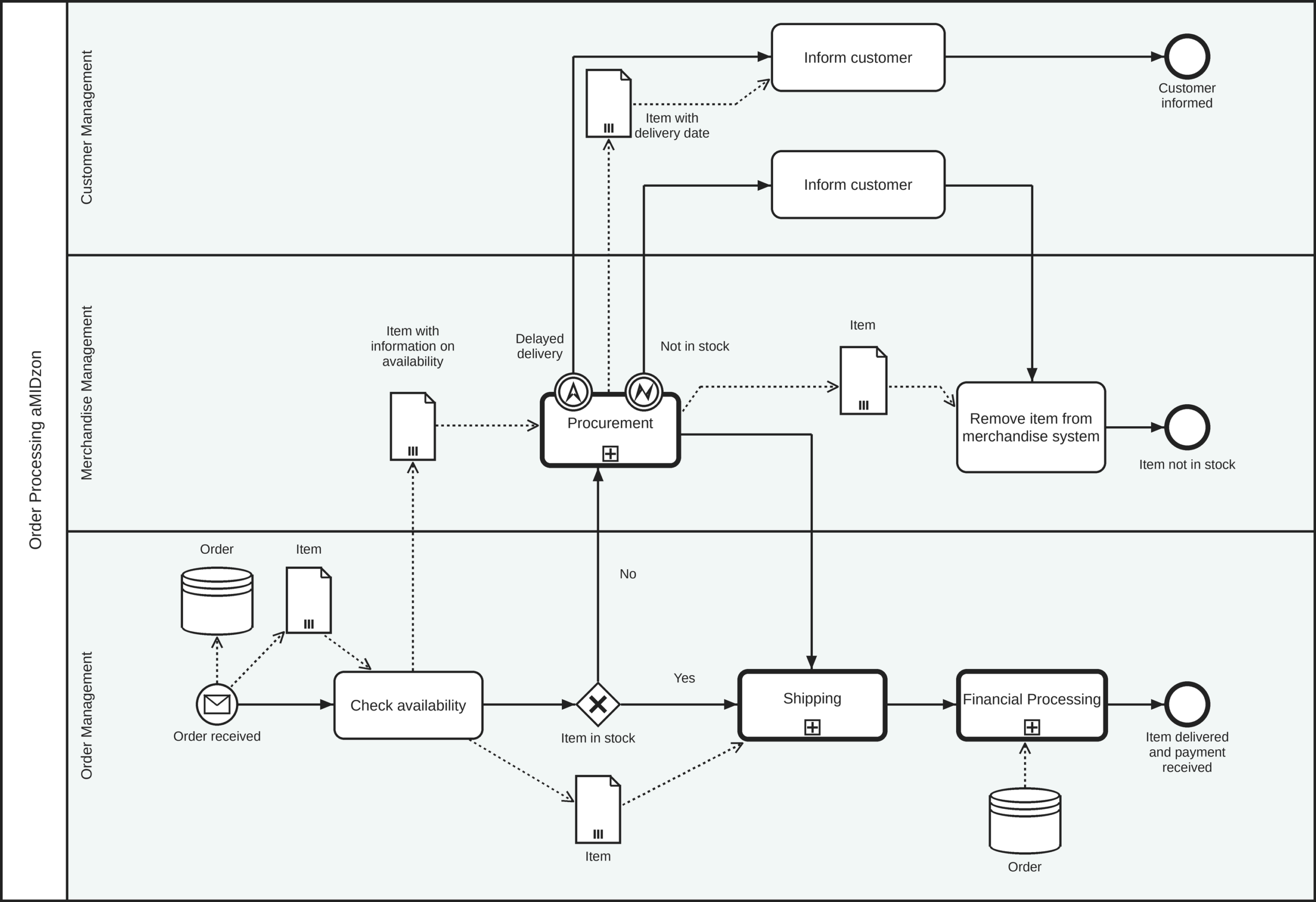
It’s about the order processing process. In addition to the core team of managers, he invites Oliver and Sophie to the meeting, as they both carry out the process every day. Since this will be the first process Wolfgang documents, he listens closely to the information from the different people and asks many questions about who exactly is responsible for which process step.
The result
In the end, he has a pretty clear idea of the process. Even though the discussion was lengthy at times, Wolfgang is sure it will get better with every process interview.
Wolfgang then gets to work and first uses the Happy Path in Bpanda to create the framework of the order processing process. Once that’s in place, he opens the process in the Bpanda Modeler and adds start and end events, gateways, subprocesses and artifacts.
The first version of the order processing process is modeled, and Wolfgang asks his core team, Oliver and Sophie for feedback using the review feature in Bpanda.
The result: Oliver points out that a process step is missing, while Sophie reports that the wrong owners are assigned in two places.
Wolfgang incorporates the feedback, and then it’s time:
Wolfgang’s recommendation:
no strings attached!
Wolfgang is amazed at how easy it was for him, as a newcomer to the world of processes, to document aMIDzon’s first processes with Bpanda. He recommends that you try it out yourself in Bpanda right away!
Wolfgang did it!
The first processes are in Bpanda, and many more will follow. Wolfgang has now worked through all 6 key questions.
But does that mean process management has really been successfully introduced at aMIDzon?
You are currently viewing a placeholder content from YouTube. To access the actual content, click the button below. Please note that doing so will share data with third-party providers.
More InformationThe first processes are in Bpanda, and many more will follow. Wolfgang has now worked through all 6 key questions.
What comes after the first processes?
Looking back
You thought strategically about why you’re introducing process management and chose a reliable tool and a great team.
You set the rules for process management in your company.
You’ve already started mapping your process landscape and documenting your first processes.
By now, he knows that a successful process management rollout doesn’t end with documented processes.
From now on, the actual management of processes begins: continuously maintaining and optimizing them. There are also many other factors you can use to secure the success of your process management rollout for the long term.
Wolfgang’s advice
Keeping things current
Keep expanding your documented processes.
This gradually gives you the complete picture of your company-wide workflows. Introduce validity periods for your approved processes to keep your process documentation regularly up to date.
When workflows change, create a new version in good time so that everyone knows right away – not only after the changed workflow has already confused everyone involved. At the same time, respond flexibly to feedback from the people carrying out the processes and approve interim versions if something has changed at short notice or the process simply runs differently in practice than expected.
Keep your process documentation up to date
Bringing processes to life
Make sure your processes are actually lived.
Process documentation that just sits unused on the company server helps no one. After all, you created it to support everyone in the company in their work and to provide transparency and efficiency.
The more regularly everyone comes into contact with the processes, the faster you build awareness of them across the company.
With human workflows, you can go one step further and run your processes live, in real time, with everyone involved. This makes collaboration in distributed teams (e.g., when working from home) run especially smoothly. Each process run also gives you important data and KPIs you can use to drive continuous improvement.
Bring your processes to life
Integration
It’s essential that you keep at it.
Ideally, set up a regular meeting where you discuss the current status of the processes and the next to-dos with the others.
Just as quality assurance is part of product development, process management then simply becomes part of your daily work.
At the start, definitely invite your core team to this regular exchange, at least monthly, and gradually widen the circle as more users come into contact with the processes and your process management software. The larger and more interconnected process management becomes in your company, the more time your core team will need, so in the long run it may make sense to set up a dedicated department or team for process management.
Make process management a firm part of everyday work
Acceptance
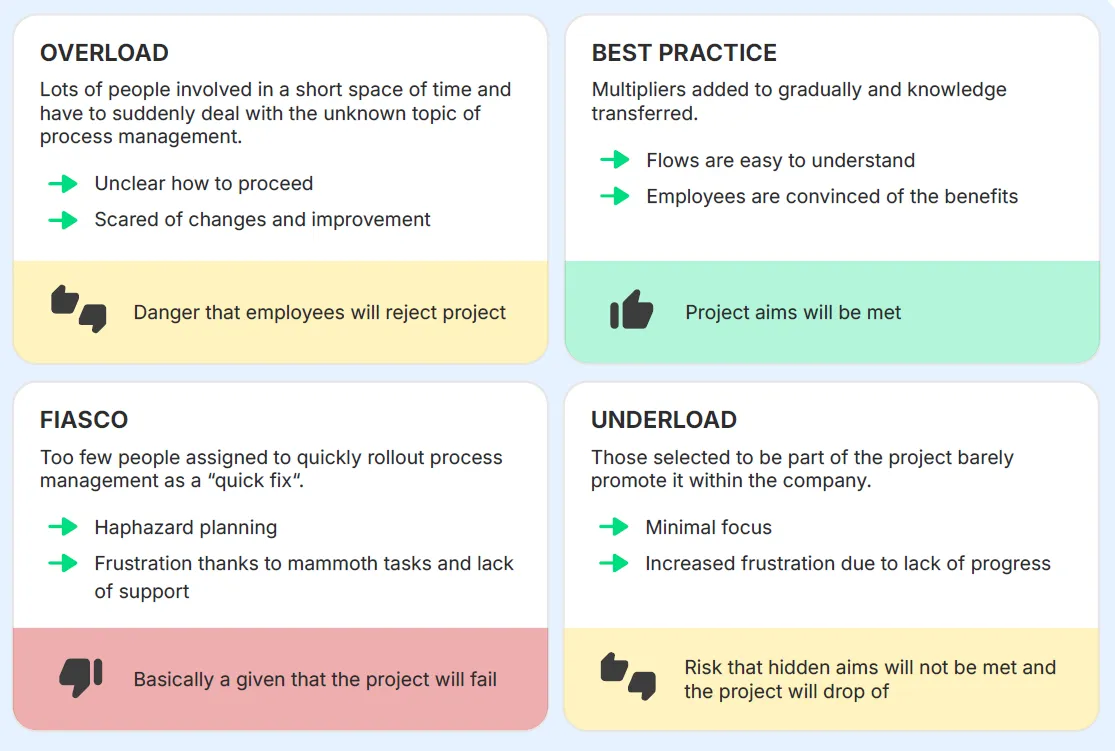
Once the pilot phase of your process management project is complete and the process documentation is to be made available to everyone in the company, don’t rush – take a strategic approach.
It’s essential to build understanding across the whole company.
For your process management initiative and its purpose. Ideally, management and the core team should take this on.
Take any concerns or skepticism from your employees seriously and consistently introduce them to the topic by building knowledge and skills, for example through trainings or explainer videos on the software and process representation.
Acceptance takes time, so don’t rush. Set realistic timelines and involve your employees. Growth usually takes on a momentum of its own over time if you’ve set up and communicated your project well. Other departments see the progress being made and want to join in. If you go about it the right way, you’ll create enthusiasm, and your process management will become even more effective with every supporter.
Build acceptance for process management across the company
You are currently viewing a placeholder content from YouTube. To access the actual content, click the button below. Please note that doing so will share data with third-party providers.
More Information